Posts
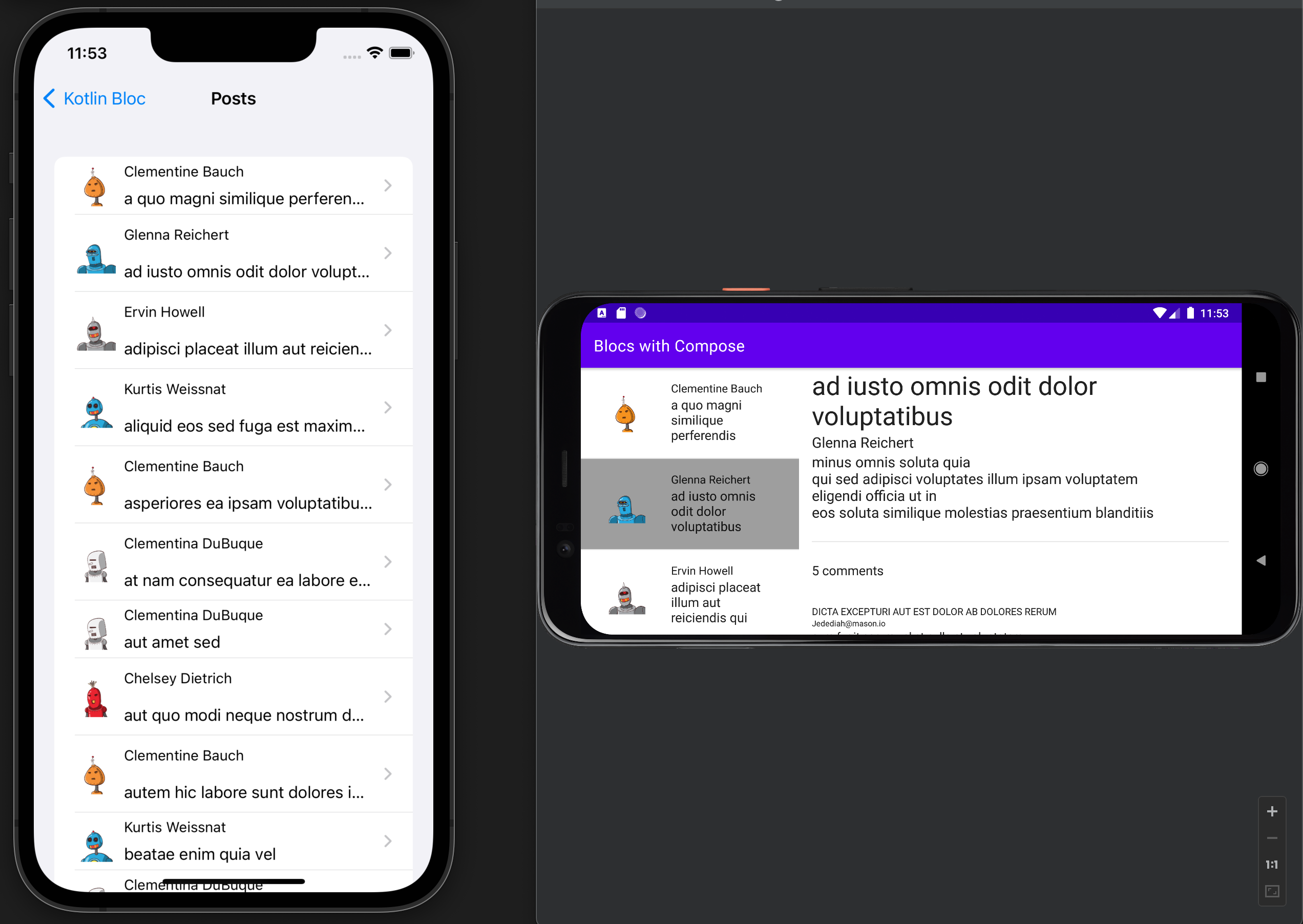
The two posts sample apps are also adapted from Orbit. They demonstrate:
- how to implement a dual pane layout
- how to run more complex asynchronous operations (this time real ones) with loading spinners and error handling
- how to use initializers
- how to use side effects
- how to combine Redux and
BlocOwner/ MVVM+ syntax - how to use Blocs with Fragments on Android
- how to define a contract for the view component
Posts 1
The first example app uses two different Blocs with separate BlocStates.
data class PostsState(
    val loading: Boolean = false,
    val posts: Result<List<Post>, Throwable> = Ok(emptyList()),
)

object Posts {
    // the Action class
    sealed class Action {
        object Load : Action()
        object Loading : Action()
        data class Loaded(val posts: Result<List<Post>, Throwable>) : Action()
        data class Clicked(val post: Post) : Action()
    }

    // the SideEffect class
    class OpenPost(val post: Post)

    fun bloc(context: BlocContext) = bloc<PostsState, Action, OpenPost, PostsState>(
        context,
        blocState(PostsState())
    ) {
        val repository = getKoinInstance<PostRepository>()

        // start loading the posts in the initializer
        onCreate {
          if (state.isEmpty()) dispatch(Action.Load)
        }

        // we could also put the thunk code into the onCreate block
        // but we want to illustrate the use of thunks
        thunk<Action.Load> {
            dispatch(Action.Loading)
            val result = repository.getOverviews()
            dispatch(Action.Loaded(result))
        }

        // this is an anti-pattern according to
        // https://medium.com/androiddevelopers/viewmodel-one-off-event-antipatterns-16a1da869b95
        // but we're doing it anyway
        sideEffect<Action.Clicked> { OpenPost(action.post) }

        reduce<Action.Loading> {
          state.copy(loading = true)
        }

        reduce<Action.Loaded> {
            state.copy(loading = false, posts = action.posts)
        }
    }
}
Android
The original sample app in Orbit uses a ViewModel and a Fragment but Kotlin Bloc eliminates the need for a ViewModel:
class PostsFragment :
    Fragment(R.layout.post_list_fragment),
    BlocOwner<PostsState, Posts.Action, Posts.OpenPost, PostsState> {

    override val bloc by getOrCreate("posts") { Posts.bloc(it) }

    override fun onResume() {
        super.onResume()

        // subscribe to the state and the side effects
        subscribe(this, ::render, ::sideEffect)
    }

    private fun render(state: PostsState) {
        // render the view
    }

    private fun sideEffect(sideEffect: Posts.OpenPost) {
        // navigate to the detail view using a side effect
        findNavController().navigate(
            PostsFragmentDirections.actionListFragmentToDetailFragment(
                sideEffect.post
            )
        )
    }
The bloc in above example is created using the key "posts":
override val bloc by getOrCreate("posts") { Posts.bloc(it) }
Activity/Fragment explains in detail why we need that key.
iOS
There's no iOS implementation for the first posts example.
Posts 2
The second example app uses a single bloc for the master and the details view/component and defines a contract between the view and the bloc to use function calls instead of actions:
abstract class PostsComponent : BlocOwner<PostsRootState, PostsAction, Unit, PostsRootState> {
    // we need this for iOS to prevent erasure of generic types
    abstract override val bloc: Bloc<PostsRootState, PostsAction, Unit>

    abstract fun onSelected(post: Post)
    abstract fun onClosed()
}
The implementing PostsComponent class is pretty straight forward:
sealed class PostsAction

class PostsComponentImpl(context: BlocContext) : PostsComponent() {

    // internal actions, not exposed to the View
    private object PostsLoading : PostsAction()
    private data class PostsLoaded(val result: Result<List<Post>, Throwable>) : PostsAction()
    private class PostLoading(val postId: Int) : PostsAction()
    private data class PostLoaded(val result: Result<Post, Throwable>) : PostsAction()

    // we need to lazy initialize the Bloc so that the component is fully initialized before
    // making any calls to load the posts
    override val bloc by lazy {
        bloc<PostsRootState, PostsAction>(context, blocState) {
            onCreate {
                // initializer code
            }

            reduce<PostsLoading> {
                // reducer code
            }

            // more reducer here
        }
    }

    // using BlocOwner / MVVM+ syntax
    override fun onSelected(post: Post) = thunk {
        // load the selected post asynchronously, simplified:
        dispatch(PostLoading(post.id))
        val result = repository.getDetail(post.id)
        dispatch(PostLoaded(result))
    }

    // using BlocOwner / MVVM+ syntax
    override fun onClosed() = reduce {
        state.copy(postState = state.postState.copy(loadingId = null, post = null))
    }
}
Android
The Android implementation doesn't introduce any new concepts compared to previous example apps. If you're interested in implementing a dual pane layout with Jetpack Compose, please consult the source code here.
iOS
The iOS implementation introduces one new concept which is the BlocComponent.
The difference to using BlocHolders is very small though:
private let component = BlocComponent<PostsComponent> { PostsComponentImpl(context: $0) }
compared to e.g.:
private let holder = BlocHolder { SimpleCounter.shared.bloc(context: $0) }